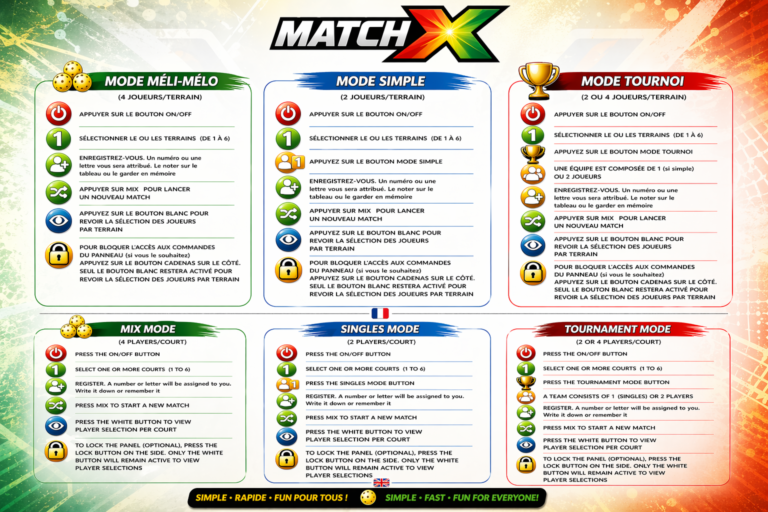
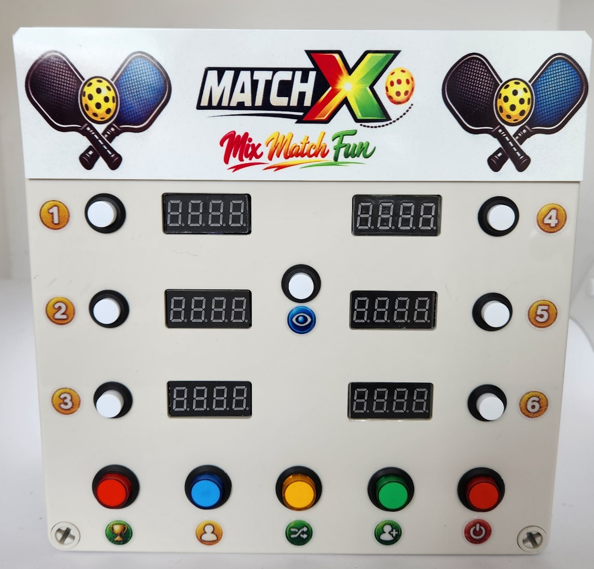
1 – On the side of the box, press the ON/OFF button.

2 – If it’s for a tournament, press the red TOURNAMENT button.

3 – Select the chosen courts from 1 to 6 (white buttons).

4 – Register players ENR (green buttons) from 1 to 9 and A to Y, for a maximum of 24 players.

5 – Press MIX (yellow button) and the registered players will be automatically shuffled across the chosen courts. For example: C – 1: 7-4 against 1-3 – C – 2: 8-5 against 6-2.

6 – You can lock the controls on the side with the BLOCK button.

This will prevent someone from accidentally pressing a button and disrupting the settings.

7 – When the matches are finished and everyone gathers for the next match, simply press the MIX button again.

THE SCOREBOARDX WILL SOON BE ON OUR SITE AND FOR SALE…. PATIENCE….

Scroll to Top